
11 NOV 2025 · UPDATED 2026 · 6 MIN READ
How to Find Clothes From a Picture
You saw an outfit. On TikTok, on a stranger, in a show you were half-watching. And then it was gone. Here is every method that actually works for finding it in 2026.
The problem is not that the outfit does not exist. It does, somewhere, on some retailer's website, in your size and your budget. The problem is that traditional search was never built for fashion. Typing "brown midi dress with asymmetric hem and puff sleeves" returns thousands of results that are adjacent but never right.
Visual search changes this. Instead of describing what you see, you show it. Here is a breakdown of every method, and which one actually gives you something you can buy.
Method 1: Google Lens
Google Lens is the most accessible starting point. You can upload any image, screenshot, photo, or saved picture and Google will try to identify what is in it. It is free, it is fast, and it is built into Chrome and Google Search.
The limitation is that Google Lens was not built for fashion. It returns a mix of visually similar images, editorial content, and blog posts, not a curated list of things you can buy. If you are searching a screenshot of a TikTok outfit, you will often land on a Pinterest board or a fashion editorial rather than a product page.
It is a useful first step, but rarely a complete answer.
Method 2: Pinterest Lens
Pinterest has its own visual search built into the app. Tap the camera icon, point it at any image, and Pinterest will surface aesthetically similar content. It is strong for identifying styles and trends. If you want to understand what category an outfit belongs to, Pinterest Lens is genuinely useful.
Where it falls short: Pinterest is an inspiration platform, not a shopping platform. Results lead back into Pinterest's ecosystem rather than to places you can actually buy the item. Great for building a moodboard, not great for finding a product link.
Method 3: Shopping via screenshot on apps
Some platforms like Amazon and ASOS have built-in visual search within their own apps. You can upload a photo and search their catalogue for similar items. This works well within a single retailer's inventory, but each search is siloed. You are only ever seeing what one store carries.
If you are searching across retail and resale, or looking for alternatives at different price points, you would have to run the same search on five different apps. It is fragmented.
Method 4: Runneth Over
Runneth Over is built specifically for this. Upload any photo or screenshot from TikTok, Instagram, Pinterest, YouTube, or your camera roll and the visual AI analyzes the clothing: silhouette, cut, fabric, color, proportion. It then surfaces similar pieces available to buy, across both retail and resale, at multiple price points.
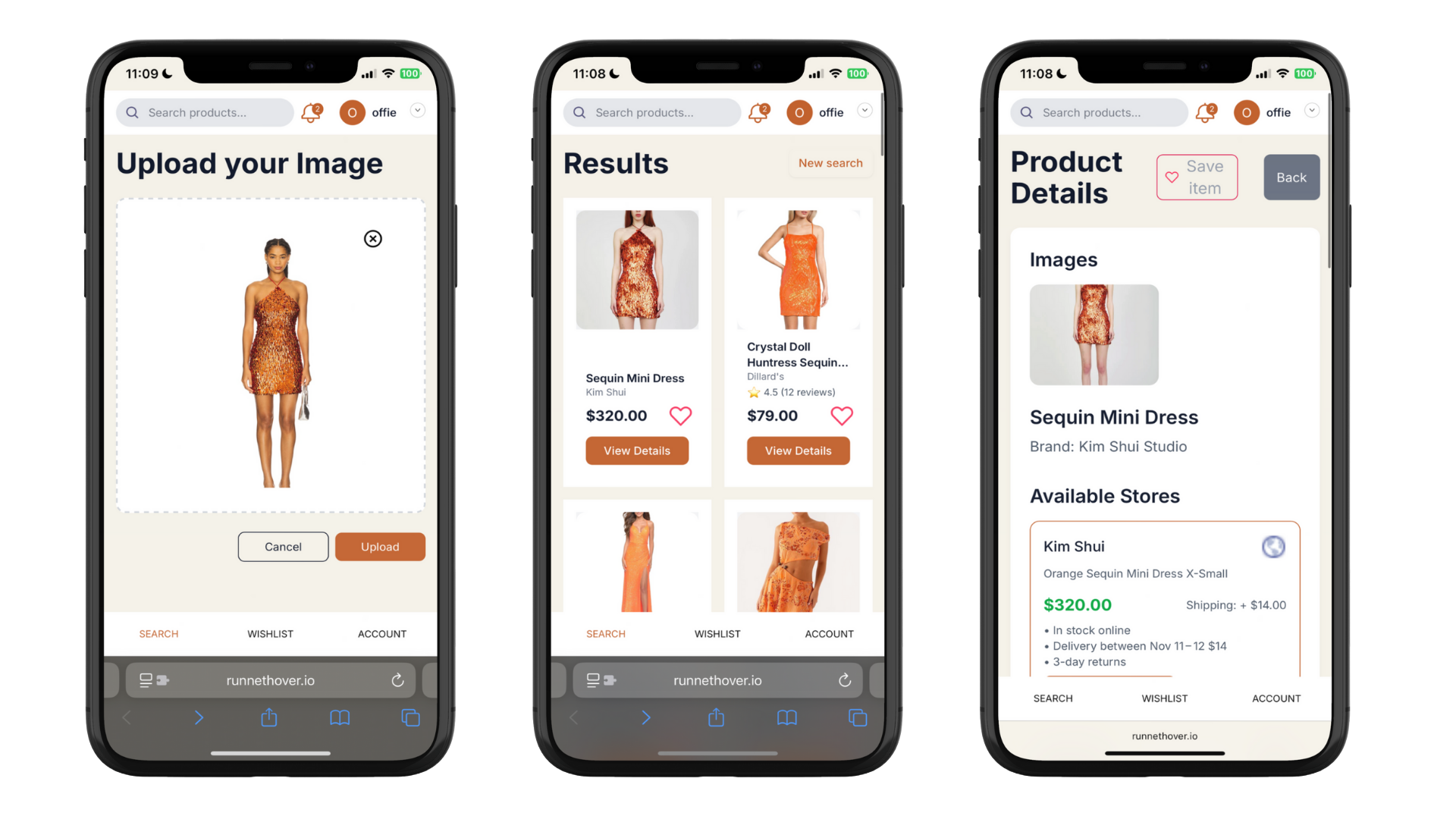
The key difference from other tools: results are shoppable. Not visually similar images, not editorial references. Actual products with prices, availability, and links to buy. And because it searches across retail and resale simultaneously, you see the original, alternatives, and dupes in one place.
Most alternatives surface between $15 and $50, depending on the category. If the exact item is still available online, Runneth Over will find it. If it is sold out, you will see the closest available matches.
What works best for different situations
If you have a high-quality photo and just want to identify the brand, start with Google Lens.
If you are building a reference board and want to understand a style, try Pinterest Lens.
If you want to find something you can actually buy, across brands and price points, from a screenshot, use Runneth Over.
The tool you need depends on what you are looking for. But if the end goal is adding something to cart, start with visual search that is built for shopping, not just image matching.